 ChatGPT
 Perplexity
 Claude
 Google AI Mode
 Grok
Quick answer — what is a technical SEO checklist?
A technical SEO checklist is a repeatable set of checks that confirms Google can find, crawl, render, index and serve your pages quickly. Work it in order: crawl first, then index, then speed and structure. If Google cannot reach a page, nothing else on the list matters for that page.
Why order matters more than the list
Google's process runs in a fixed order — crawl, render, index, rank — and a problem early in that chain makes everything after it irrelevant. Run this checklist in order, fix what you find at each stage before moving on, and repeat it after every redesign or platform change.
Part 1 — Can Google crawl your site? (Checks 1–7)
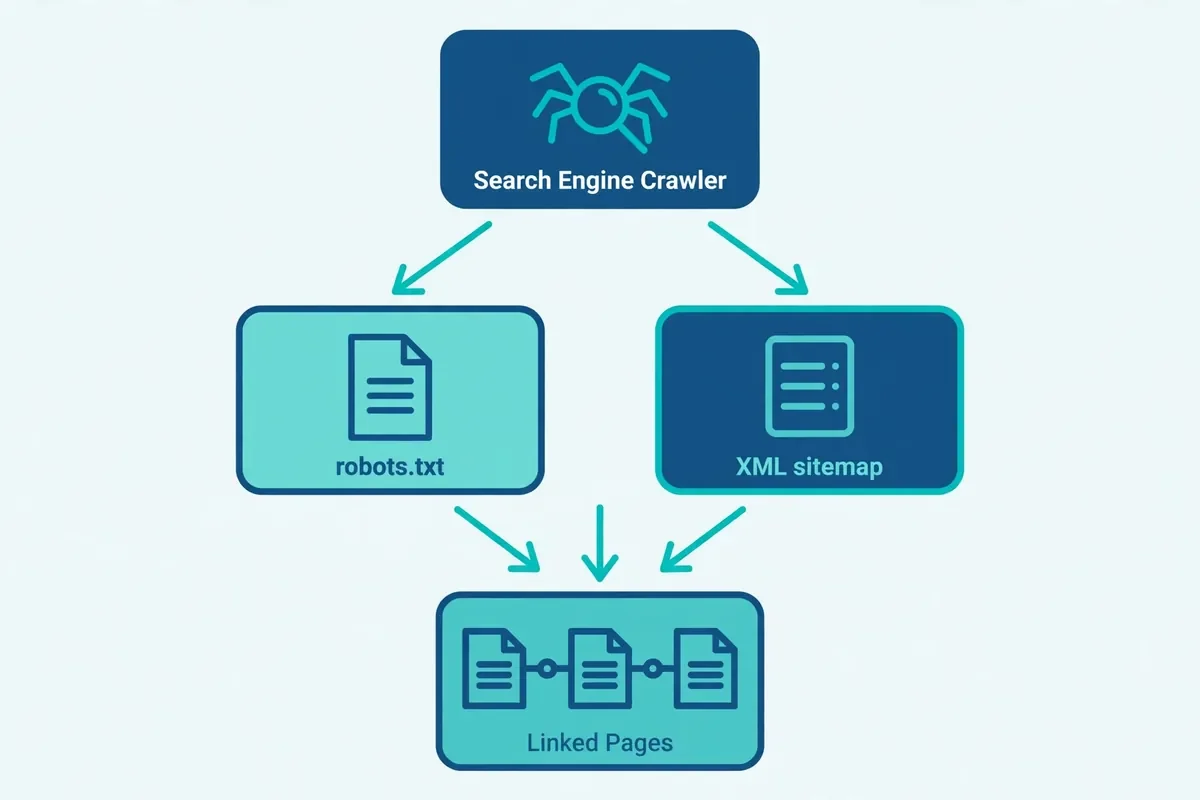
- Does robots.txt return 200? Open yoursite.com/robots.txt. It should load, not return a server error. A 5xx or a timeout here is a site-wide emergency.
- Is anything important blocked? Read every Disallow line. One stray Disallow: /, often left over from staging, blocks the whole site.
- Are CSS and JavaScript allowed? Google needs the files a page needs to render. Blocking a CSS or JavaScript folder leaves Google looking at a broken page.
- Is the sitemap declared? Your robots.txt should carry a Sitemap: line with the full sitemap URL, and the sitemap should be submitted in Search Console.
- Is the sitemap clean? One file holds at most 50,000 URLs or 50 MB uncompressed. List only canonical, indexable URLs that return 200 — no redirects, no 404s, no noindex pages.
- Are important pages linked, not hidden? Google finds most pages by following links. A page reachable only through a search box, a form or a script may never be found. Every important page needs a normal link from somewhere Google already crawls.
- Is your firewall or CDN blocking Googlebot? A bot rule can block Googlebot even when robots.txt looks fine. Check logs for 403s, and do the same for AI crawlers — OAI-SearchBot and PerplexityBot — if you want citations in AI answers too.
Crawl budget is rarely the issue for a small site. Google's crawl-budget guidance is written for sites with over a million pages, or over 10,000 pages that change daily.
Part 2 — Will Google index the page? (Checks 8–13)
- Is the page indexed? Open the Page indexing report in Search Console and read "Why pages aren't indexed". A page crawled but not indexed is telling you something — usually thin content, a duplicate, or a canonical pointing elsewhere.
- Is there an accidental noindex? Check the meta robots tag and the X-Robots-Tag HTTP header. A server-level noindex is invisible in the HTML, so check with curl -I. Never block a noindexed page in robots.txt as well: Google then cannot see the noindex instruction at all.
- Does every page have one self-referencing canonical? If the same content is available at several URLs — with and without www, with tracking parameters, http and https — the canonical tag tells Google which one is main. A canonical is a hint, not a command.
- Are duplicates consolidated? Parameter URLs, trailing-slash variants and print versions should canonicalise to one clean URL, not each live as a separate page.
- Is the content in the HTML? Google renders JavaScript, but rendering can be delayed and can fail. Title, description, canonical and structured data should be in the server response, not injected by client-side JavaScript. Use URL Inspection to see the rendered HTML Google actually gets.
- Does mobile match desktop? Mobile-first indexing has applied to all sites since October 2023, so Google indexes the mobile version. If mobile hides content, links or structured data that desktop shows, Google will not see them.
Part 3 — Is the page fast and stable? (Checks 14–18)
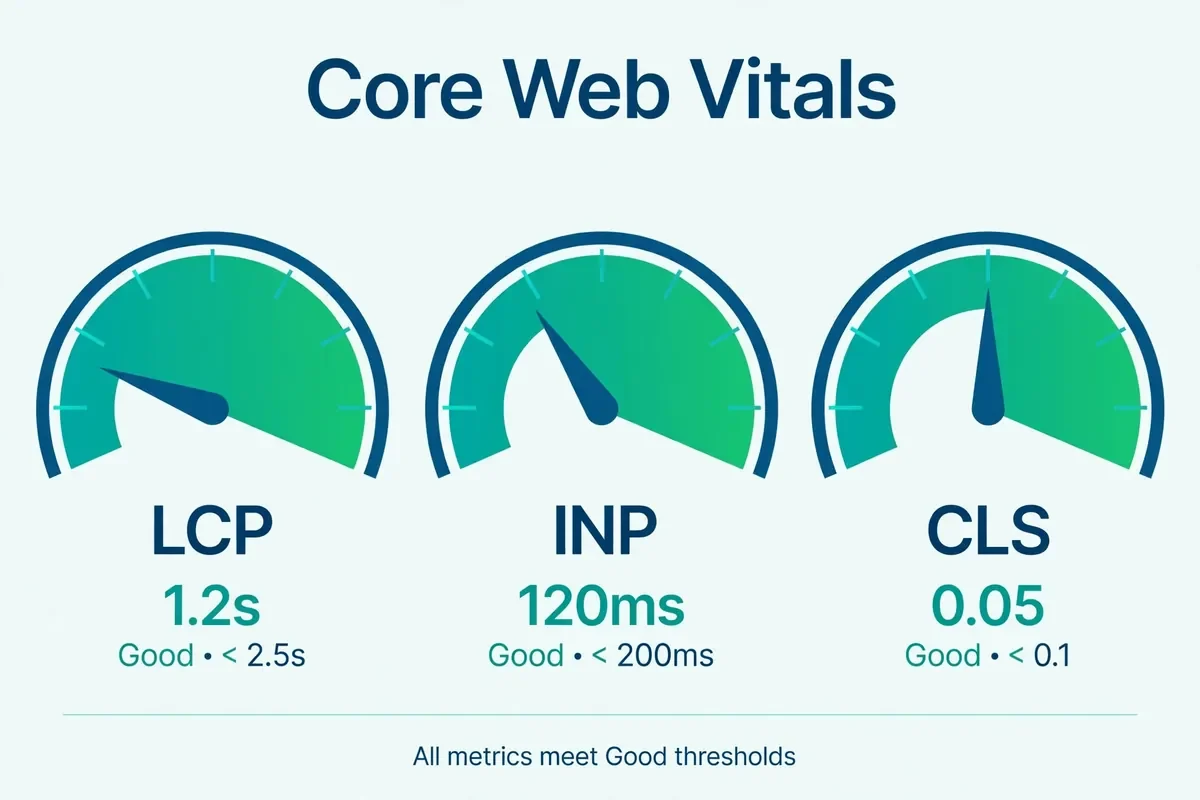
- Does the page pass Core Web Vitals? At the 75th percentile of real page loads: Largest Contentful Paint 2.5 seconds or less, Interaction to Next Paint under 200 milliseconds, and Cumulative Layout Shift under 0.1. Check the Core Web Vitals report in Search Console first — it groups URLs that share a problem.
- Are images resized and compressed? A 4 MB photo straight from a phone is the most common cause of a slow LCP. Resize it, compress it, and use a modern format.
- Is anything shifting the layout? Set width and height on images and embeds, and reserve space for anything that loads late. A page that jumps while it loads fails CLS and annoys every visitor.
- Is the site HTTPS everywhere? Every page should load over HTTPS with a valid certificate, no mixed content, and http redirecting to https in a single hop.
- Is mobile actually usable? Test on a real phone, not only in a desktop browser resized. Tap targets, font sizes and forms that work on desktop can all fail on mobile — and mobile is what Google indexes.
Part 4 — Can search engines understand the page? (Checks 19–25)
- Is structured data valid? Mark up only what is visible on the page and validate it with Google's Rich Results Test. A typical business site uses Organization, WebSite, WebPage, BreadcrumbList and, where they fit, Service, Article and FAQPage. There is no special "AI schema".
- Are titles and descriptions unique? Every indexable page needs its own title and description. Duplicates across pages are a sign that templates are being copied without thought.
- Is the internal linking doing its job? Important pages should be a few clicks from the homepage, linked with descriptive anchor text, and not orphaned.
- Are redirects single-hop 301s? A redirect chain — A to B to C — wastes crawl budget and leaks authority. Map old URLs to their replacement in one hop, and return 410 for pages that are genuinely gone.
- Are there broken internal links? Crawl the site and fix every internal link that returns a 4xx or 5xx. Google treats most 4xx errors the same way, and slows crawling when it sees many 5xx errors.
- Is hreflang correct, if you use it? Only relevant if you serve the same content in more than one language or region. If you do, every language version must link to every other version, including itself. If you serve one language in one country, skip this check.
- Is Bing covered too? Verify the site in Bing Webmaster Tools and submit the sitemap there. ChatGPT search leans heavily on Bing's index, so a page missing from Bing can be missing from ChatGPT answers as well.
What to check monthly, and what to check once
Check monthly in Search Console: the Page indexing report, the Core Web Vitals report, and the Performance report for any sudden drop. Crawl the site quarterly, or after any redesign or platform change. Run a full audit once or twice a year, and re-check robots.txt and the sitemap every time a developer ships a change.
How to measure it
Measure the fix, not the checklist. Before you start, write down the baseline: pages indexed, URLs in the "not indexed" table and why, URLs failing Core Web Vitals, and internal links returning an error. Measure the same four numbers again after 30 days.
Common mistakes
- Blocking a page in robots.txt and adding noindex. Google cannot read the noindex if it cannot crawl the page. Use noindex alone, and keep the page crawlable.
- Trusting lab data alone. Lighthouse lab runs are a starting point. Field data from real users — the Chrome User Experience Report in Search Console — is what Google uses for ranking.
Myths to stop paying for
- "Technical SEO is a one-time job." It is a routine. A site that was clean in January can be broken by June.
- "You need a crawl budget fix." Most sites do not. Unless you have over a million pages or 10,000 pages changing daily, your problem is a blocked page or a broken link, not a budget.
- "A technical audit guarantees rankings." It does not. Technical SEO removes the blockers. Content and links still have to earn the ranking.
The checklist, in one place
- robots.txt returns 200.
- Nothing important blocked.
- CSS and JavaScript allowed.
- Sitemap declared.
- Sitemap clean.
- Important pages linked.
- Firewall not blocking Googlebot or AI crawlers.
- Page indexing report read.
- No accidental noindex.
- One self-referencing canonical per page.
- Duplicates consolidated.
- Content in the HTML.
- Mobile matches desktop.
- Core Web Vitals pass.
- Images resized and compressed.
- No layout shift.
- HTTPS everywhere.
- Mobile usable.
- Structured data valid.
- Unique titles and descriptions.
- Internal linking — no orphans.
- Single-hop 301 redirects.
- No broken internal links.
- Hreflang correct, if used.
- Bing verified.
Frequently asked questions
How often should I run a technical SEO audit?
Check Search Console monthly, crawl quarterly, and run a full audit once or twice a year — and after any redesign or platform change.
What is the most important technical SEO check?
Robots.txt and indexation, in that order. If Googlebot cannot reach a page, or the page is not indexed, no other check matters for that page. Speed, schema and internal links all come after crawl and index.
Do Core Web Vitals still matter in 2026?
Yes. Google says Core Web Vitals are used by its ranking systems: LCP 2.5 seconds or less, INP under 200 milliseconds, CLS under 0.1 at the 75th percentile. They are one signal among many, not a guarantee.
Can I do a technical SEO audit myself?
Most of it, yes. Search Console, PageSpeed Insights and the free version of Screaming Frog — which crawls up to 500 URLs — cover most small business sites.
Does technical SEO help with AI search?
Yes, and it is the same work. AI Overviews draw on Google's index, ChatGPT search leans on Bing's, and Perplexity runs its own live index. Allow OAI-SearchBot and PerplexityBot if you want citations. Google's position is that optimising for its AI features is still SEO.
What to do next
Run the checklist in order, starting with robots.txt and the Page indexing report, and write down your baseline numbers before you start so you can measure the result in 30 days.
Every engagement starts with a free audit. Request one — it now includes a technical SEO check: crawl, index, Core Web Vitals and structured data, plus an AI-visibility check across ChatGPT, Perplexity and Google.

Abu Hosain
Digital Marketing Strategist & White-Hat SEO Expert — 7+ years helping businesses worldwide grow with SEO, AEO and GEO.